반응형


MFC 프로그램 창에서 PreTranslateMessage 함수를 이용하여 키보드 키 조합으로 Ctrl + A 또는 C를 누를때 printf 출력합니다.

작성된 코드를 참고하시고 활용하시기 바랍니다.


# 개발 환경

운영체제 : Windows 10 Pro 64bit

개발도구 : Visual Studio 2019 Community


# 필요 함수


# 결과

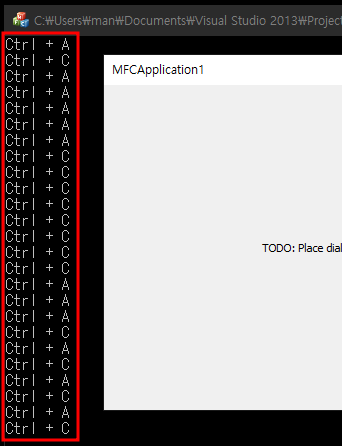
  • PreTranslateMessage 함수에 키보드 Ctrl+A, C를 누를 시 printf 출력


# 예제 소스

- PreTranslateMessage(MSG* pMsg)

BOOL CMFCApplication1Dlg::PreTranslateMessage(MSG* pMsg)
{
    if(pMsg->message == WM_KEYDOWN){
        if(GetKeyState(VK_CONTROL) & 0x8000){
            if     (pMsg->wParam == 65) printf("Ctrl + A\n");
            else if(pMsg->wParam == 67) printf("Ctrl + C\n");
        }   
    }

    return CDialogEx::PreTranslateMessage(pMsg);
}
  • pMsg 매개변수로 입력한 키 정보를 받을 수 있습니다.
  • pMsg->meesage 로 통해 윈도우메시지를 받음(WM_KEYDOWN = 키 누를 때) (윈도우메시지 보기)
  • pMsg->wParam 로 통해 가상키(Virtual Key)를 받음 (VK_code) (가상코드 보기)
  • GetKeyState 로 통해 키의 토글 상태 값과 0x8000 AND연산
    - 0x8000 : 이전에 누른 적이 없고 호출 시점에서 눌린 상태


감사합니다.


잘못된 정보나 오타 및 수정사항이 있을 경우 댓글로 달아주시면 감사하겠습니다. 


반응형
반응형


MFC 프로그램 창에서 마우스 또는 키보드 입력에 대한 이벤트를 처리할 수 있는 함수(PreTranslateMessage)를
"클래스 마법사" 로 통해 만들어 낼 수 있습니다.


# 개발 환경

운영체제 : Windows 10 Pro 64bit

개발도구 : Visual Studio 2013 Professional


# 결과

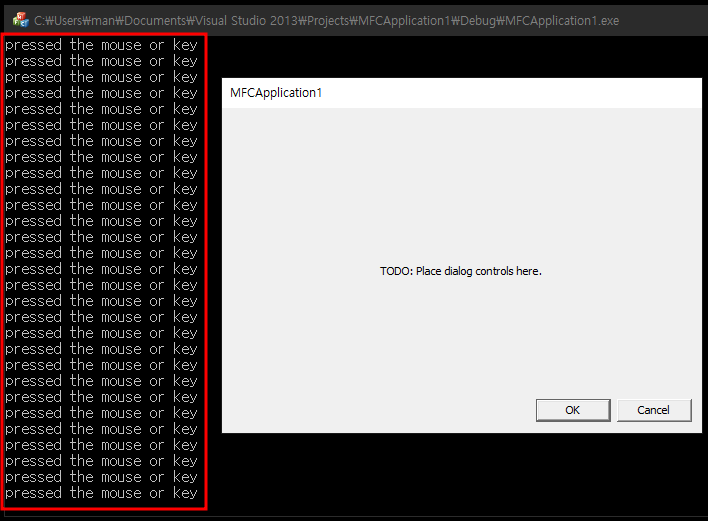
  • PreTranslateMessage 함수에 printf 를 작성하여 마우스 및 키보드 입력 테스트 확인
  • 마우스 또는 키보드 입력(클릭, 키, 움직임)한 경우 printf 출력


# 이벤트 함수 생성

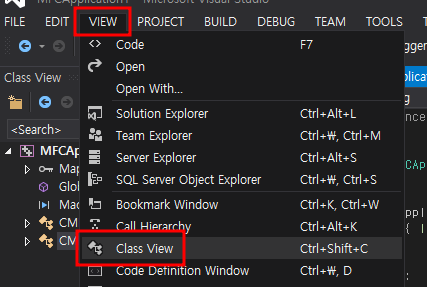
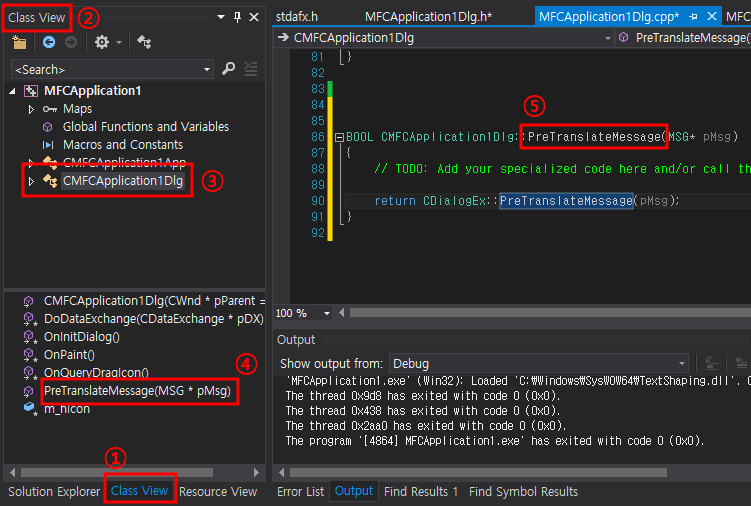
1. 클래스 뷰(Class View) 오픈


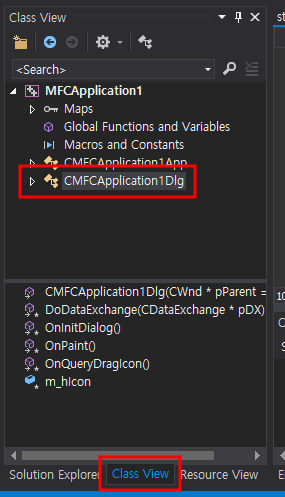
2. 클래스 선택

  • 본 프로젝트는 새로 만든 프로젝트로 이름은 다를 수 있습니다.
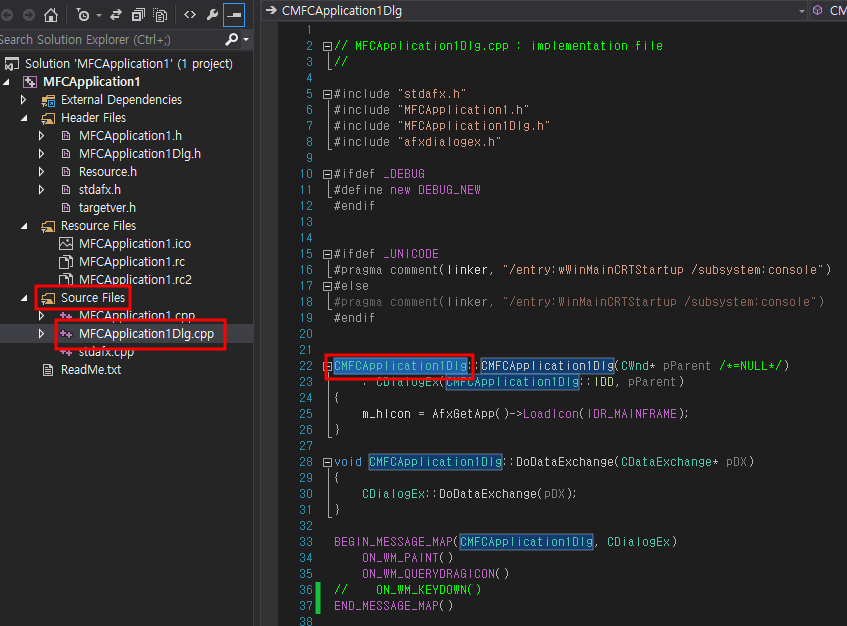
  • (아래 왼쪽 그림) CMFCApplication1Dlg 는 처음 프로젝트를 만들 시 main 다이얼로그에 대한 클래스입니다.
  • (아래 오른쪽 그림) CMFCApplication1Dlg 은 솔루션탐색기에서 Source Files 폴더에 ~~Dlg.cpp 라는 파일 더블클릭하시면 ~~Dlg::함수이름 으로 된 것을 확인할 수 있습니다.


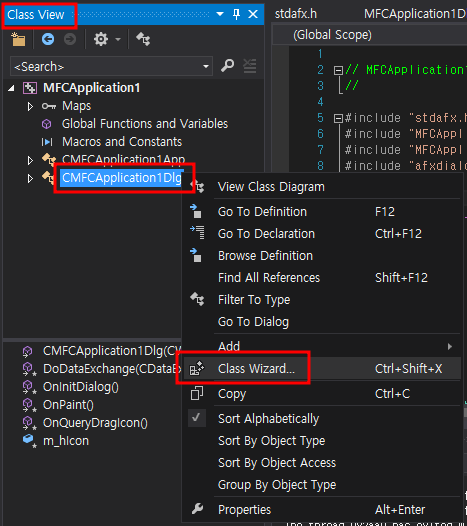
3. 클래스 마법사(Class Wizard)

  • 클래스 뷰에서 CMFCApplication1Dlg 에 오른쪽 마우스 클릭 후 "클래스 마법사(Class Wizard)" 클릭


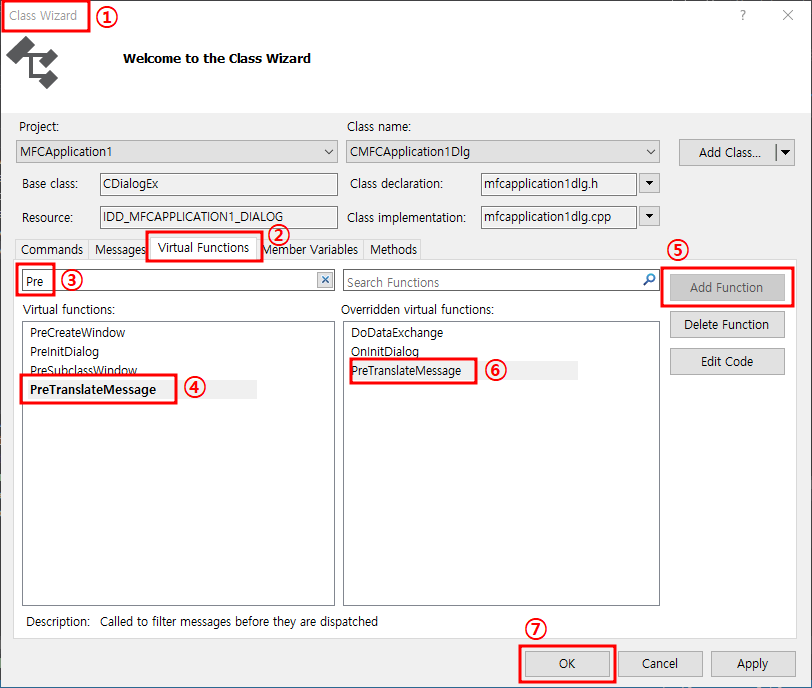
4. 이벤트 함수 생성
  1) 클래스 마법사 창 오픈
  2) 가상 함수(Virtual Functions) 메뉴 탭 선택
  3) "PreTranslateMessage" 입력
  4) PreTranslateMessage 함수 선택
  5) 함수 추가 버튼 클릭
  6) 추가된 함수 확인
  7) 확인


5. PreTranslateMessage 함수 소스 확인


# 전체 예제 소스

  • BOOL CMFCApplication1Dlg::PreTranslateMessage(MSG* pMsg) 참고.
#include "stdafx.h"
#include "MFCApplication1.h"
#include "MFCApplication1Dlg.h"
#include "afxdialogex.h"

#ifdef _DEBUG
#define new DEBUG_NEW
#endif

#ifdef _UNICODE
#pragma comment(linker, "/entry:wWinMainCRTStartup /subsystem:console")
#else
#pragma comment(linker, "/entry:WinMainCRTStartup /subsystem:console")
#endif

CMFCApplication1Dlg::CMFCApplication1Dlg(CWnd* pParent /*=NULL*/)
	: CDialogEx(CMFCApplication1Dlg::IDD, pParent)
{
	m_hIcon = AfxGetApp()->LoadIcon(IDR_MAINFRAME);
}

void CMFCApplication1Dlg::DoDataExchange(CDataExchange* pDX)
{
	CDialogEx::DoDataExchange(pDX);
}

BEGIN_MESSAGE_MAP(CMFCApplication1Dlg, CDialogEx)
	ON_WM_PAINT()
	ON_WM_QUERYDRAGICON()
END_MESSAGE_MAP()


BOOL CMFCApplication1Dlg::OnInitDialog()
{
	CDialogEx::OnInitDialog();

	SetIcon(m_hIcon, TRUE);	
	SetIcon(m_hIcon, FALSE);


	return TRUE;
}

void CMFCApplication1Dlg::OnPaint()
{
	if (IsIconic())
	{
		CPaintDC dc(this); // device context for painting

		SendMessage(WM_ICONERASEBKGND, reinterpret_cast<WPARAM>(dc.GetSafeHdc()), 0);

		// Center icon in client rectangle
		int cxIcon = GetSystemMetrics(SM_CXICON);
		int cyIcon = GetSystemMetrics(SM_CYICON);
		CRect rect;
		GetClientRect(&rect);
		int x = (rect.Width() - cxIcon + 1) / 2;
		int y = (rect.Height() - cyIcon + 1) / 2;

		// Draw the icon
		dc.DrawIcon(x, y, m_hIcon);
	}
	else
	{
		CDialogEx::OnPaint();
	}
}

HCURSOR CMFCApplication1Dlg::OnQueryDragIcon()
{
	return static_cast<HCURSOR>(m_hIcon);
}

BOOL CMFCApplication1Dlg::PreTranslateMessage(MSG* pMsg)
{
    // TODO: Add your specialized code here and/or call the base class

    printf("pressed the mouse or key\n");

    return CDialogEx::PreTranslateMessage(pMsg);
}


감사합니다.


잘못된 정보나 오타 및 수정사항이 있을 경우 댓글로 달아주시면 감사하겠습니다. 


반응형

+ Recent posts