반응형

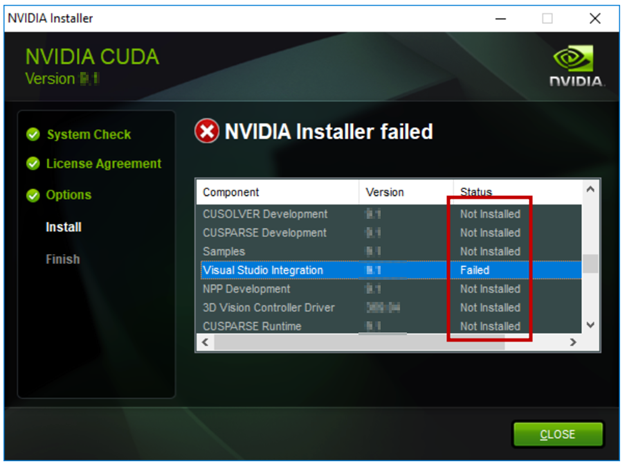
1. 증상

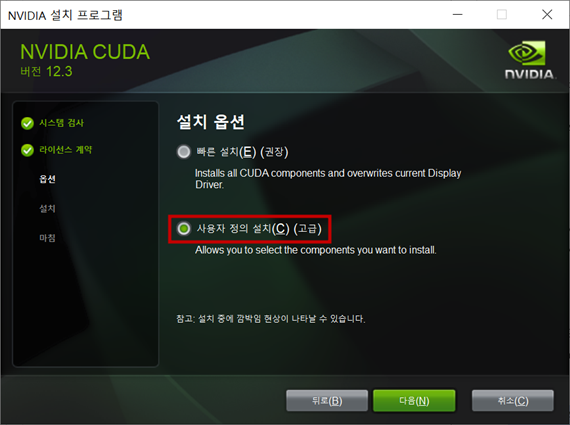
  • 아래와 같이 설치 실패가 되는 경우가 있다.


2. 해결방법

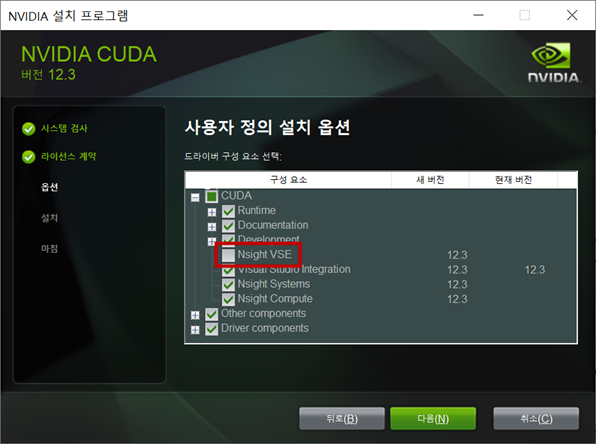
  • CUDA 체크트리에서 Nsight VSE (visual studio edition) 체크하지 않음

3. NSight Visual Studio Edition 설치하기 (1/2)


Gameworks Download Center

No downloads meet your criteria.

developer.nvidia.com


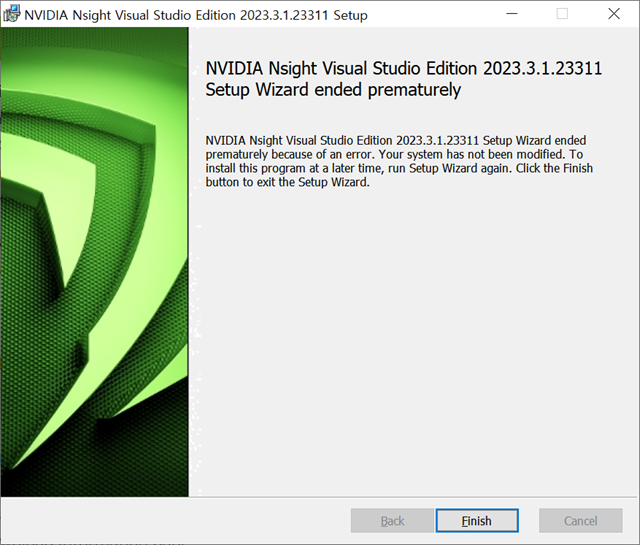
  • 다운받은 파일을 설치진행한다.


4. NSight Integration 설치 (2/2)

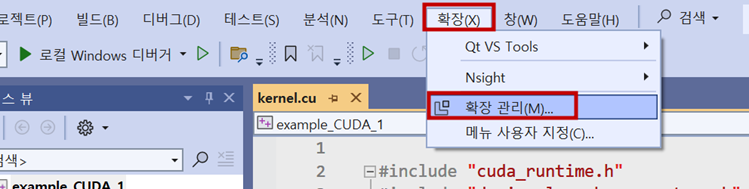
  • 체크되지않은 설치목록은 Visual Studio 프로그램 내 "확장관리" 에서 다운받는다.

1) Visual Studio 프로그램 상단 메뉴 "확장" 메뉴 선택


2) NSight 검색 후 다운로드


3) Visual Studio 닫기 → 자동설치

4) Visual Studio 재실행 → 상단 "확장" 메뉴 확인


5) 설치완료


감사합니다.

잘못된 정보나 오타 및 수정사항이 있을 경우 댓글로 달아주시면 감사하겠습니다. 


반응형
반응형

1. 환경구성

  • 운영체제 : Windows 10 pro 22H2
  • 하드웨어
    - 현재 구성으로 GPU1은 디스플레이용, GPU2는 컴퓨팅용
CPU 라이젠7 3700X
GPU1 라데온 RX570
GPU2 NVIDIA Geforce T400 4GB
  • 설치할 CUDA toolkit 버전 : CUDA toolkit 12.3 update 2


2. NVIDIA 그래픽카드 드라이버 설치

  • CUDA 프로그래밍을 하기 위해 NVIDIA사 그래픽카드를 사용하여야 한다.

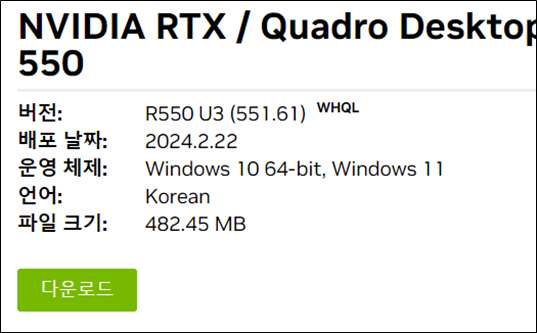
1) NVIDIA 그래픽카드 드라이버 다운로드
- https://www.nvidia.co.kr/Download/index.aspx?lang=kr


Download the latest official NVIDIA drivers

Download the latest official NVIDIA drivers

www.nvidia.com


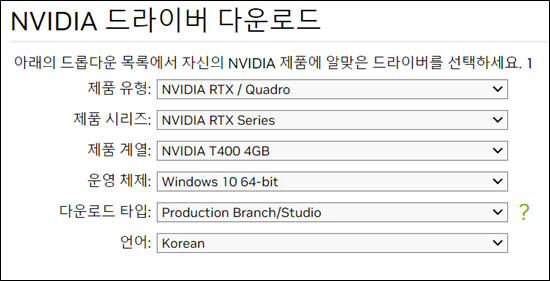
2) 그래픽카드 선택 및 검색


3) 다운로드 후 설치(설치과정생략)
- 설치는 기본옵션으로 설치함


3. CUDA toolkit 버전 지원 확인


CUDA - Wikipedia

From Wikipedia, the free encyclopedia Parallel computing platform and programming model Compute Unified Device Architecture (CUDA) is a parallel computing platform and application programming interface (API) that allows software to use certain types of gra

en.wikipedia.org

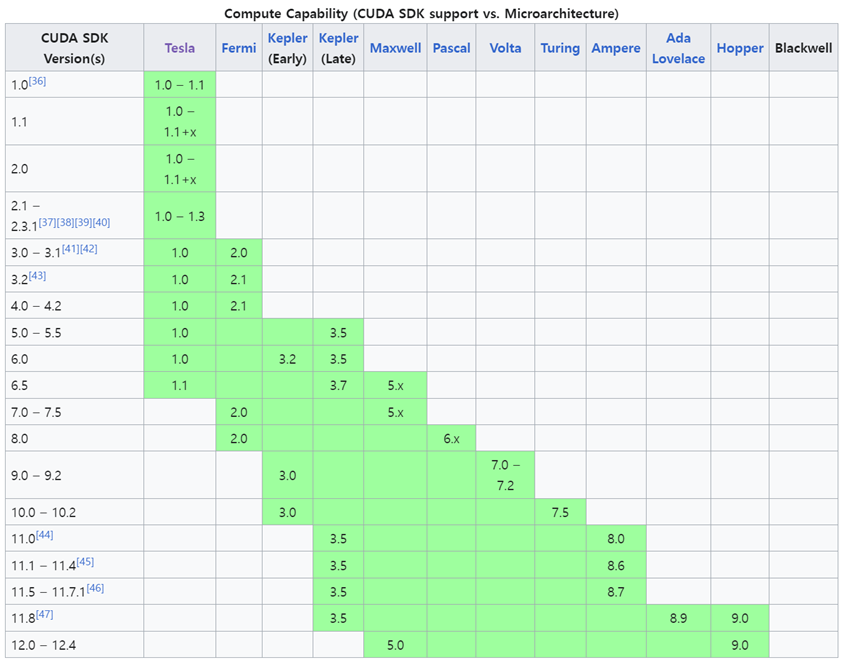
  • 아래 그림은 GPU 아키텍처별 지원가능한 CUDA toolkit 버전을 표시하고 있다.
    예) NVIDIA Geforce T400 4GB 그래픽카드인 경우 GPU 아키텍처는 "Turing" 이므로 CUDA toolkit 버전은 10.0 ~ 10.2을 볼 수 있다.
  • 연두색 블럭CUDA toolkit버전마다 지원가능한 GPU아키텍처를 표시된다. 현재 Turing GPU 아키텍처는 CUDA toolkit 12.4까지 지원이 가능하는 것을 볼 수 있다.


4. CUDA toolkit 설치

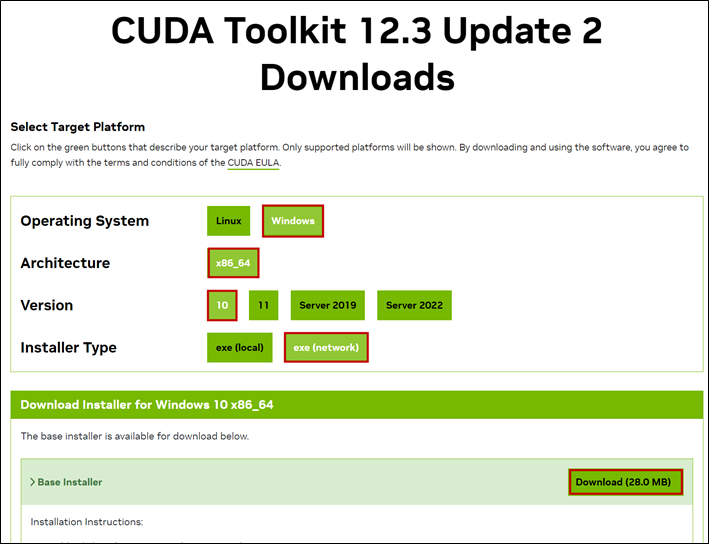
1) CUDA toolkit 다운로드 홈페이지 접속 후 해당 버전 선택하기
- https://developer.nvidia.com/cuda-toolkit-archive 


CUDA Toolkit Archive

Previous releases of the CUDA Toolkit, GPU Computing SDK, documentation and developer drivers can be found using the links below. Please select the release you want from the list below, and be sure to check www.nvidia.com/drivers for more recent production

developer.nvidia.com


2) 타겟 플랫폼 선택 후 다운로드


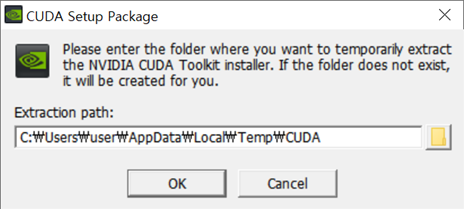
3) 설치하기(설치과정생략)
- 설치 오류 시 아래 링크 클릭

2024.04.19 - [C++/CUDA] - [C++/CUDA] NVIDIA installer failed, CUDA 설치 오류(VisualStudio)


[C++/CUDA] NVIDIA installer failed, CUDA 설치 오류(VisualStudio)

1. 증상 아래와 같이 설치 실패가 되는 경우가 있다. 2. 해결방법 CUDA 체크트리에서 Nsight VSE (visual studio edition) 체크하지 않음 3. NSight Visual Studio Edition 설치하기 (1/2) 체크되지않은 설치목록은 NVIDIA
manbedded.tistory.com


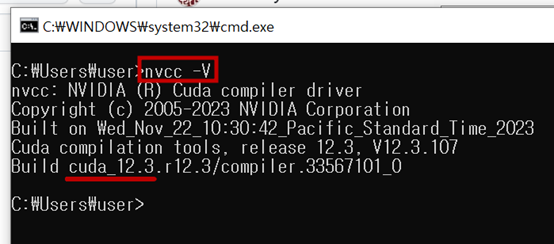
4) 설치완료 및 버전확인


5. 예제소스 실행 1

1) NVIDIA에서 제공하는 CUDA예제소스 다운로드
- https://github.com/NVIDIA/cuda-samples 


GitHub - NVIDIA/cuda-samples: Samples for CUDA Developers which demonstrates features in CUDA Toolkit

Samples for CUDA Developers which demonstrates features in CUDA Toolkit - NVIDIA/cuda-samples

github.com


2) 다운받은 CUDA예제소스 압축파일 풀기

3) 예제소스 실행
- cuda-samples-master → Samples → 1_Utilities → deviceQuery
- 설치된 Visual Studio 버전에 맞게 .sln 실행하기


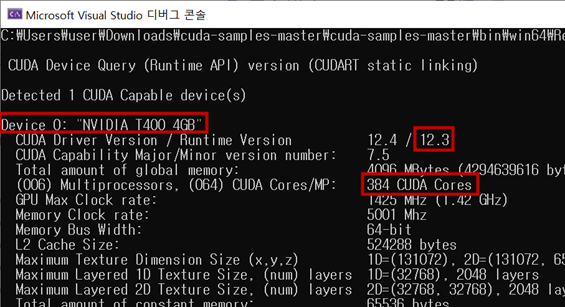
4) 실행결과
- GPU 장치확인, CUDA toolkit 버전, CUDA코어 개수 확인


6. 예제소스 실행 2

1) 예제소스

#include "cuda_runtime.h"
#include "device_launch_parameters.h"

#include <iostream>

#define N 1024*1024*1024

__global__ void vector_add_gpu(float *out, float *a, float *b, int n) {
    for(int i = 0; i < n; i++){
        out[i] = a[i] + b[i];
    }
}


__host__ void vector_add_cpu(float *out, float *a, float *b, int n) {
    for(int i = 0; i < n; i++){
        out[i] = a[i] + b[i];
    }
}

int main(){
    float *a, *b, *out; 

    // Allocate memory
    a   = (float*)malloc(sizeof(float) * N);
    b   = (float*)malloc(sizeof(float) * N);
    out = (float*)malloc(sizeof(float) * N);

    for(int i = 0; i < N; i++){
        if(i==0){
            a[i] = 2.0001f;
            b[i] = 2.0001f;
        }else{
            b[i] = 2.0001f;
            a[i] = 2.0002f + a[i-1];
        }
    }

    time_t start, end;
    start = clock();
    vector_add_cpu(out, a, b, N);
    end = clock();
    printf("CPU elapsed time:%d, result:%f\n", (int)(end-start), a[N-1]);


    // Main function
    start = clock();
    vector_add_gpu<<<1,1>>>(out, a, b, N);
    end = clock();
    printf("GPU elapsed time:%d, result:%f\n", (int)(end-start), a[N-1]);

    free(a  );
    free(b  );
    free(out);

    return 1;
}


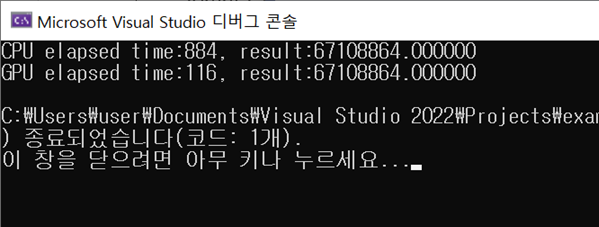
2) 결과
- CPU 경과시간 : 884ms
- GPU 경과시간 : 116ms


감사합니다.

잘못된 정보나 오타 및 수정사항이 있을 경우 댓글로 달아주시면 감사하겠습니다. 


반응형
반응형

1. MPI(Message Passing Interface)

  • 메시지 전달 인터페이스
  • 분산 메모리 장치에서 프로그래밍하는 방법, 모든 병렬 프로세스가 다른 프로세스와 독립된 상태에서 자체 메모리 공간에서 병렬처리 발생
    (참고: https://stackoverflow.com/questions/32464084/what-are-the-differences-between-mpi-and-openmp)
  • MS-MPI 라이브러리 사용 권장
    - MPICH 라이브러리를 Window에서 사용할 수 있도록 MS사에서 만듦
  • 코드로 제어 불가능. 부분 병렬처리 불가능
 

What are the differences between MPI and OpenMP?

I would like to know (in a few words) what are the main differences between OpenMP and MPI.

stackoverflow.com


2. 환경구축


Microsoft-MPI/examples/helloworld/Run_MPIHelloWorld.md at master · microsoft/Microsoft-MPI

Microsoft MPI. Contribute to microsoft/Microsoft-MPI development by creating an account on GitHub.

github.com


1) Microsoft MPI 다운로드 및 설치
- https://www.microsoft.com/en-us/download/details.aspx?id=100593


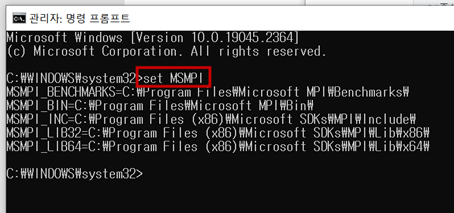
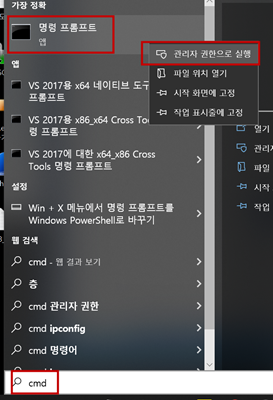
2) 환경 변수 확인 : 명령프로프트 관리자 권한으로 실행 (set MSMPI 입력)


3) Visual studio 프로젝트 생성

4) 프로젝트 설정(C/C++ → General)
- 현재 플랫폼 32/64-bit 주의.
- C/C++ → General à Additional Include Directories →  $(MSMPI_INC);$(MSMPI_INC)\x64 입력 (64-bit)
- C/C++ →  General à Additional Include Directories →  $(MSMPI_INC);$(MSMPI_INC)\x86 입력 (32-bit)


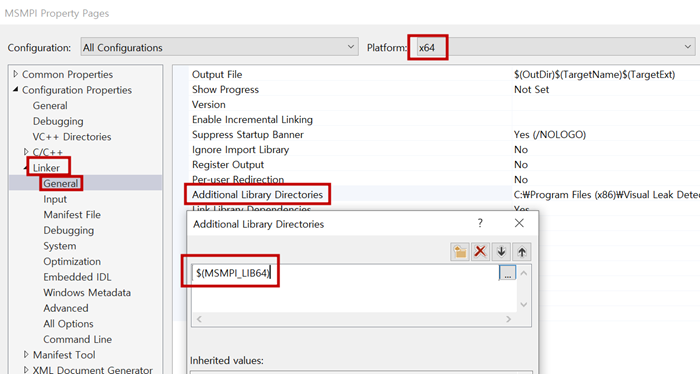
5) 프로젝트 설정(Linker  General)
- 현재 플랫폼 32/64-bit 주의.
- Linker  General  Additional Library Directories  $(MSMPI_LIB64) 입력 (64-bit)
- Linker  General  Additional Library Directories  $(MSMPI_LIB32) 입력 (32-bit)


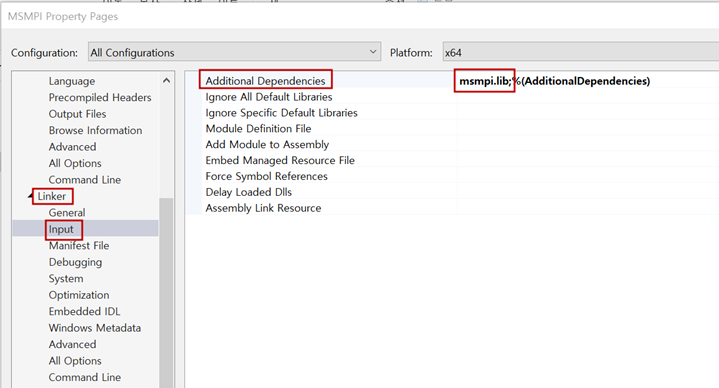
6) 프로젝트 설정(Linker  Input)
- Linker  Input  Additional Dependencies  msmpi.lib 입력


3. 테스트

#include <iostream>
#include <mpi.h>

using namespace std;

int main(void)
{
    int my_rank;
	int world_size;

	MPI_Init(NULL, NULL);

	MPI_Comm_size(MPI_COMM_WORLD, &world_size);
	MPI_Comm_rank(MPI_COMM_WORLD, &my_rank);

	std::cout << "Hello World from process " << my_rank << " out of " << world_size << " processes!!!" << std::endl;

	MPI_Finalize();

    cout << "Finished" << endl;

    getchar();
    
    return 0;
}


4. 실행

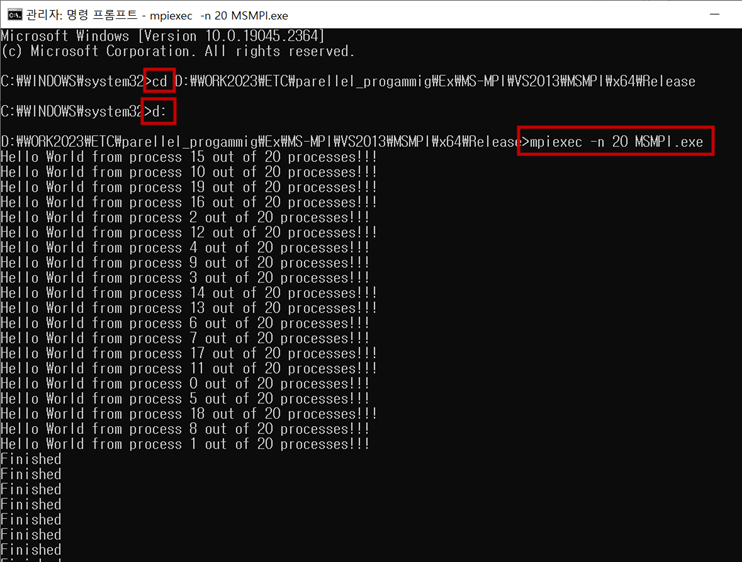
1) 관리자권한으로 명령프롬프트 실행


2) 빌드된 프로그램 폴더 경로 설정 및 실행
- $ cd 명령어로 경로 설정
- C:드라이브에서 D:드라이브로 경로 설정 시 d:입력
- $ mpiexec –n 20 MSMPI.exe 입력


5. 문법

  • 버전확인
// MPI 버전
int ver;
int subVer;
MPI_Get_version(&ver, &subVer);

// MPI 라이브러리 버전
char cVer[32];
int len;
MPI_Get_library_version(cVer, &len);

감사합니다.

잘못된 정보나 오타 및 수정사항이 있을 경우 댓글로 달아주시면 감사하겠습니다. 


반응형
반응형

1. OpenMP (Multi-processing)

  • 각 스레드나 프로세스가 제약없이 메모리를 액세스할 수 있도록 설계되어 있음
  • 개발자가 병렬로 실행될 코드의 블록만을 간단하게 설정하고, 세밀한 제어는 컴파일이나 런타임 시스템에게 맡기는 방식
  • 컴파일러나 런타임 시스템이 스레드의 디테일한 동작을 제어하기 때문에 간단하게 구현 할 수 있음.


2. OpenMP vs pthreads

OpenMP pthreads
개발자가 병렬로 실행될 코드의 블록만 설정 개발자가 명시적으로 각 스레드의 형태 설정
컴파일러나 런타임 시스템이 스레드의 세밀한 동작을 제어함 Low Level로 thread의 실행 형태를 세밀하게 제어 할 수 있음
코드를 간단하게 사용할 수 있음(쉬움) 용도에 따라 구현이 필요함(어려움)


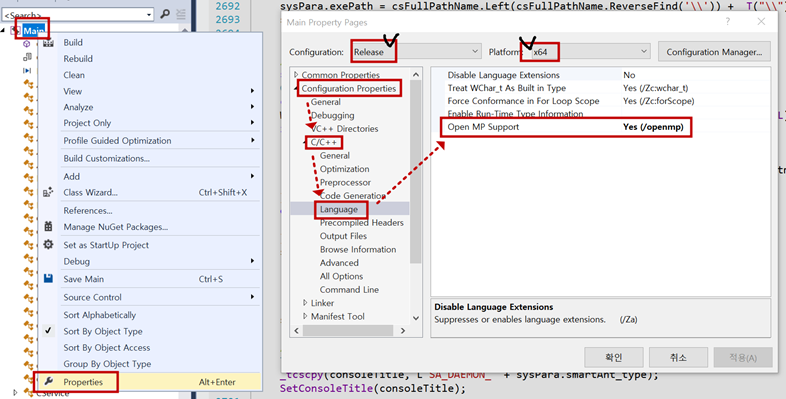
3. 환경구축

  • Windows 10 pro, visual studio 2013 pro


4. 테스트

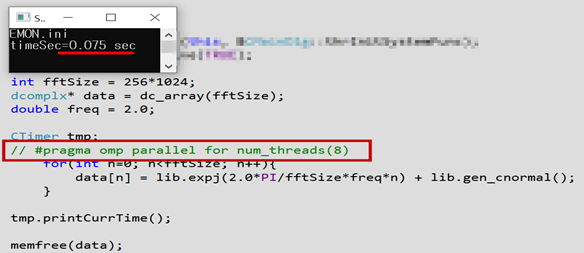
  • 싸인파 예제소스 fftSize=256K 
  • 병렬 OFF (75msec)


  • 병렬 ON (16msec)


5. 문법

  • num_threads를 생략하면, 현재 PC의 CPU 논리프로세서의 수만큼 스레드를 실행함.
#pragma omp parallel for  or  #pragma omp parallel for num_threads(thrMAX)
#pragma omp parallel  or  #pragma omp parallel num_threads(thrMAX)
#pragma omp parallel
{
	// 현재 블록은 parallel 모드 상태, parallel 생략함
    #pragma omp critical
    #pragma omp for
    #pragma omp atomic
}


  • for문
// for문 문법
#pragma omp parallel for
#pragma omp parallel for num_threads(thrMAX)
//-----------------------------

// example
#pragma omp parallel for ( num_threads(8) )
for(int n=0; n<fftSize; n++){
    data[n] = lib.expj(2.0*PI/fftSize*freq*n) + lib.gen_cnormal();
}


  • 블록단위
// 블록단위
#pragma omp parallel
#pragma omp parallel num_threads(thrMAX)
//---------------------------

// example
#pragma omp parallel //  num_threads(numThr)
{
	int rank = omp_get_thread_num();
	int numCntThr = omp_get_num_threads();
	printf("rank=%d, numCntThr=%d\n", rank, numCntThr);
}


  • 크리티컬섹션 1
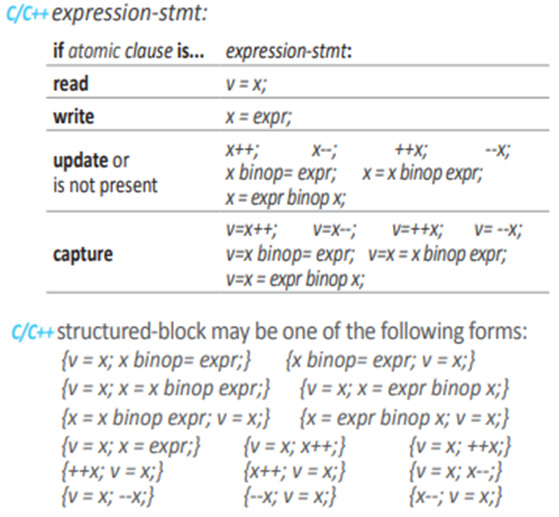
    - 연간, 공유 변수 접근 시 사용
    - 지원되는 종류만 사용 가능, 불가능한 경우 critical로 대체

// critical section
#pragma omp atomic
//-------------------------

// example
int shareCnt = 0;
#pragma omp parallel
{
	#pragma omp atomic
	shareCnt ++;
}


  • 크리티컬섹션 2
// critical section
#pragma omp critical
// ------------------------

// example
int shareCnt = 0;
#pragma omp parallel
{
	#pragma omp critical
	{
		shareCnt += 1;
	}
}

감사합니다.

잘못된 정보나 오타 및 수정사항이 있을 경우 댓글로 달아주시면 감사하겠습니다. 


반응형

+ Recent posts